The qtpy-datalogger Python package has been an infrequent but bursty effort since Halloween 2024, and I have a collection of QT Py S3 devices for development. And unsurprisingly, they're on different versions of CircuitPython 9.x, which was the style at the time.
For a while now, however, each time I run qtpy-datalogger equip and it begins the circup step to install support libraries, the tool reports
Found device adafruit_qtpy_esp32s3_4mbflash_2mbpsram at E:\, running CircuitPython 9.1.3.
A newer version of CircuitPython (10.2.1) is available.
Get it here: https://circuitpython.org/board/adafruit_qtpy_esp32s3_4mbflash_2mbpsram
So let's upgrade to CircuitPython 10 and check whether qtpy-datalogger needs to adapt.
It would be nice to update the Features page to claim support, too.
Prelude
Surprises in the familiar
In the early days of the project when I bought these QT Py S3 devices, they shipped with CircuitPython 8.x preinstalled. I upgraded them to the latest available release of CircuitPython 9 after each delivery, which is why they are on different versions. While it may sound like disorganized happenstance, which it certainly was, this also increased the baseline environment coverage. So another win for laziness.
These 8.x-to-9.x upgrades were simple. The notes for the 9.0.0 release had minimal advisories about the upgrade.
- Enter UF2 bootloader mode
- Copy the new CircuitPython image to the QT Py
- Wait for the device to apply the image and restart itself in the new version
But CircuitPython 10 might be different. The major version bump from 9 to 10 is the clue, even if the upgrade from 8 to 9 was uneventful.
Return to origins
One of the best ways to do something and achieve the least surprising outcome is to follow the directions. I'd go so far as to say that, for this version of CircuitPython in particular, upgrading without referencing the documentation is something an unthinking bot would do.
So let's put on our 90's POSIX hat and RTFM (read the flipping manual).
https://github.com/adafruit/circuitpython/releases/tag/10.0.0
Indeed, there is a whole section titled "Incompatibility warnings when upgrading to 10.0.0 from 9.x.x", and its first bullet has a seldom-needed step:
You must update the TinyUF2 bootloader on all ESP32-S2 and ESP32-S3 4MB flash boards to TinyUF2 0.33.0 or later
So in addition to upgrading the version of CircuitPython (which when done on its own, only needs UF2 bootloader mode like the 9.x upgrades I did earlier), I also need to upgrade the UF2 bootloader itself. This will require using ROM bootloader mode.
And the release compassionately allows reverting the upgrade:
This bootloader update is compatible with CircuitPython 9.1.0 and later.
These details and fallbacks feel rare these days. To me it seems like most of tech has succumbed to either growth-hacking or creating shareholder value in a way that usually "inspires" them to apply dark UX patterns or support only the very newest release. I'm thankful that Adafruit continues to prioritize user choice and diversity.
Other interesting items in the release announcement:
- Merge MicroPython updates up to MicroPython v1.25.0.
- Update Espressif ESP-IDF to 5.4.1.
Perhaps a qtpy-datalogger sensor node can detect its CircuitPython version and use the new features in the updated internals.
I am excited to learn what they are and whether they would be useful… but that is for another day and post.
Upgrade
Before I can start, however, I need to check another manual: the device-specific instructions for QT Py S3. This initial page explains why the the TinyUF2 bootloader must be upgraded (TLDR: the flash partitions changed in number and size to accommodate larger CircuitPython builds) and then forwards the reader to the boot loader installation page, which in turn forwards the reader to main CircuitPython download page. After selecting my QT Py device model, I finally arrive at the real recipe for the upgrade.
Adafruit QT Py ESP32-S3 4MB Flash/2MB PSRAM
- Confirm the QT Py model by inspecting its
boot_out.txtfileAdafruit CircuitPython 9.1.3 on 2024-08-29; Adafruit QT Py ESP32-S3 4MB Flash 2MB PSRAM with ESP32S3 - Backup the contents of the QT Py device because the upgrade will reformat the flash
- Eject the QT Py device drive
- Enter ROM bootloader mode
- Hold the Boot button down
- Press and release the Reset button
- Release the Boot button
- Click the Open installer button on the CircuitPython page for the Adafruit QT Py ESP32-S3 4MB Flash
- Adafruit has a dedicated page with more details about this workflow
- The remaining steps are summarized below
- Select the Full CircuitPython installation option
- This upgrades both the UF2 bootloader and CircuitPython
- Click the installer's Connect button
- Select the COM port for the QT Py device
- Click the Continue button to erase the flash
- Wait for the ROM bootloader to write the new UF2 bootloader onto the flash
- Press and release the Reset button on the QT Py device
- This restarts the device into UF2 bootloader mode
- Inspect the contents of the
INFO_UF2.TXTfile to confirm the new UF2 version
- Click the Select BOOT drive button
- Select the QT Py device drive
- Allow the browser to edit files on the device
- Acknowledge the folder name mismatch warning
- Wait for the UF2 bootloader to write the new CircuitPython onto the flash
- I canceled the rest of the dialog steps
- The remaining steps configure the
settings.tomlfile - But I'm using the one I backed up earlier
- The remaining steps configure the
- Confirm the version of CircuitPython by inspecting the
boot_out.txtfileAdafruit CircuitPython 10.2.1 on 2026-05-13; Adafruit QT Py ESP32-S3 4MB Flash 2MB PSRAM with ESP32S3
Check
First look
Without even restoring any files, I should be able to qtpy-datalogger connect to the QT Py device and interact with the REPL.
> qtpy-datalogger connect --port COM4
INFO     ---   Miniterm on COM4   Opts: 115200,8,N,1    ---
INFO     ---   Quit: Ctrl+]        Help: Ctrl+T then H   ---
Auto-reload is on. Simply save files over USB to run them or enter REPL to disable.

Press any key to enter the REPL. Use CTRL-D to reload.

Adafruit CircuitPython 10.2.1 on 2026-05-13; Adafruit QT Py ESP32-S3 4MB Flash 2MB PSRAM with ESP32S3
>>> import board
>>> from microcontroller import cpu
>>> import os
>>> import sys
>>> cpu.temperature
45.0
>>> board.board_id
'adafruit_qtpy_esp32s3_4mbflash_2mbpsram'
>>> os.uname()
(sysname='ESP32S3', nodename='ESP32S3', release='10.2.1', version='10.2.1 on 2026-05-13', machine='Adafruit QT Py ESP32-S3 4MB Flash 2MB PSRAM with ESP32S3')
>>> sys.implementation.name
'circuitpython'
>>> sys.version_info
(3, 4, 0)
>>>
INFO     Reconnect with 'qtpy-datalogger connect --port COM4'
This looks great. The QT Py device has been successfully upgraded, and it can report its version and system information.
Let's try the Getting started walkthrough for qtpy-datalogger to uncover any initial surprises.
Search for devices
When I explored the REPL above, I connected directly to the QT Py with the --port option.
This bypasses QT Py device detection and immediately opens the serial port.
I want to see whether qtpy-datalogger can detect this new CircuitPython version.
By using an empty MQTT group, I can skip searching the network.
> qtpy-datalogger connect --discover-only --group ''
INFO     Discovering serial ports
INFO     Discovering disk volumes
INFO     Scanning the network for sensor_node devices in group ''
INFO     Identifying QT Py devices
WARNING  No QT Py devices found!
Oof. We have an initial surprise! After some debugging, I created an issue in the CircuitPython project and adapted for this new behavior.
> qtpy-datalogger connect --discover-only --group ''
INFO     Discovering serial ports
INFO     Discovering disk volumes
INFO     Scanning the network for sensor_node devices in group ''
INFO     Identifying QT Py devices

INFO           Port   Drive  QT Py device                         Node ID               Group ID
INFO           -----  -----  -----------------------------------  --------------------  ------------
INFO       1:  COM4   E:\    Adafruit QT Py ESP32-S3 2MB PSRAM                          zone2
There it is! Hello, node.
Install the sensor node runtime
Now I want to see whether qtpy-datalogger can equip a QT Py sensor node.
> qtpy-datalogger equip
INFO     Discovering serial ports
INFO     Discovering disk volumes
INFO     Scanning the network for sensor_node devices in group ''
INFO     Identifying QT Py devices
INFO     Auto-selected 'Adafruit QT Py ESP32-S3 2MB PSRAM' as port 'COM4' on 'E:\'
INFO     Probing for sensor_node at 'E:\'
INFO      - version    (missing)
INFO      - timestamp  0001.01.01  01:01:01
INFO     Detecting installed external CircuitPython modules
INFO     Initializing new QT Py Sensor Node
INFO     Installing sensor_node v1.0.12rc0.dev0 to 'E:\'
INFO       Installing external dependencies with circup
INFO       Invoking 'circup --path E:\ --board-id adafruit_qtpy_esp32s3_4mbflash_2mbpsram --cpy-version 10.2.1 install --upgrade adafruit_connection_manager adafruit_minimqtt neopixel'

Found device adafruit_qtpy_esp32s3_4mbflash_2mbpsram at E:\, running CircuitPython 10.2.1.
Downloading '10mpy' bundle for adafruit/Adafruit_CircuitPython_Bundle (20260620).
10.x-mpy:
Extracting:  [####################################]  100%

OK

Using latest bundle for adafruit/Adafruit_CircuitPython_Bundle (20260620).
Downloading '10mpy' bundle for adafruit/CircuitPython_Community_Bundle (20260616).
10.x-mpy:
Extracting:  [####################################]  100%

OK

Using latest bundle for adafruit/CircuitPython_Community_Bundle (20260616).
Searching for dependencies for: ['adafruit_connection_manager', 'adafruit_minimqtt', 'neopixel']
Ready to install: ['adafruit_connection_manager', 'adafruit_minimqtt', 'adafruit_pixelbuf', 'adafruit_ticks', 'neopixel']

Installed 'adafruit_connection_manager'.
Installed 'adafruit_minimqtt'.
Installed 'adafruit_pixelbuf'.
Installed 'adafruit_ticks'.
Installed 'neopixel'.

INFO     Installation complete
Ok! No error messages. Let's check serial communication.
UART control
Does the node respond to UART messages?
> qtpy-datalogger connect
INFO     Discovering serial ports
INFO     Discovering disk volumes
INFO     Scanning the network for sensor_node devices in group 'zone1'
INFO     Identifying QT Py devices
INFO     Auto-selected 'Adafruit QT Py ESP32-S3 2MB PSRAM' as port 'COM4' on 'E:\'
INFO     ---   Miniterm on COM4   Opts: 115200,8,N,1    ---
INFO     ---   Quit: Ctrl+]        Help: Ctrl+T then H   ---
BLE:Off | code.py | 10.2.1
hello node
received: hello node
qtpycmd stats
59.250 kB used | 1951.750 kB free | 1320.98 s uptime
qtpycmd read A0
[11136.468] (raw ADC codes, 15 samples averaged)
qtpycmd pixel blink
Used color 0x2200aa
Yes, it does! Time to check WiFi.
MQTT control
Before the QT Py can use MQTT, it needs to connect to the network using its WiFi radio.
I haven't restored the settings.toml file on it yet, so it should report missing secrets like the WiFi password.
> qtpy-datalogger equip --secrets
INFO     Discovering serial ports
INFO     Discovering disk volumes
INFO     Scanning the network for sensor_node devices in group ''
INFO     Identifying QT Py devices
INFO     Auto-selected 'Adafruit QT Py ESP32-S3 2MB PSRAM' as port 'COM4' on 'E:\'
INFO     Probing for sensor_node at 'E:\'
INFO      - version    1.0.12rc0.dev0
INFO      - timestamp  2026.06.26  20:01:36
INFO     Found 19 total module references   * external   . builtin   ~ internal
INFO      * adafruit_connection_manager
INFO      * adafruit_minimqtt
INFO      * neopixel
INFO      . analogio
INFO      . board
INFO      . busio
INFO      . digitalio
INFO      . gc
INFO      . json
INFO      . microcontroller
INFO      . os
INFO      . supervisor
INFO      . sys
INFO      . time
INFO      . usb_cdc
INFO      . wifi
INFO      ~ linebuffer
INFO      ~ py_shell
INFO      ~ snsr
INFO     Detecting installed external CircuitPython modules
INFO      * adafruit_connection_manager 3.1.8
INFO      * adafruit_minimqtt    8.1.0
INFO      * adafruit_pixelbuf    2.0.12
INFO      * adafruit_ticks       1.1.7
INFO      * neopixel             6.4.2
INFO     Detecting secrets
INFO      * CIRCUITPY_WIFI_PASSWORD   MISSING
INFO      * CIRCUITPY_WIFI_SSID       MISSING
INFO      * QTPY_BROKER_IP_ADDRESS    MISSING
INFO      * QTPY_NODE_GROUP           MISSING
INFO      * QTPY_NODE_NAME            MISSING
INFO     Skipping installation: not an upgrade, use '--force' to override
After restoring the settings.toml file from backup, I can confirm with the same command.
> qtpy-datalogger equip --secrets
...
INFO     Detecting secrets
INFO      * CIRCUITPY_WIFI_PASSWORD   ok
INFO      * CIRCUITPY_WIFI_SSID       ok
INFO      * QTPY_BROKER_IP_ADDRESS    ok
INFO      * QTPY_NODE_GROUP           ok
INFO      * QTPY_NODE_NAME            ok
And I can check for its presence on the network, too.
qtpy-datalogger connect --discover-only --group zone2
INFO     Discovering serial ports
INFO     Discovering disk volumes
INFO     Scanning the network for sensor_node devices in group 'zone2'
INFO     Identifying QT Py devices

INFO           Port   Drive  QT Py device                         Node ID               Group ID
INFO           -----  -----  -----------------------------------  --------------------  ------------
INFO       1:  COM4   E:\    Adafruit QT Py ESP32-S3 2MB PSRAM    node-4f21afa56341-0   zone2
When a device has a Node ID, that means it has connected to the MQTT broker. Now I am finally ready to test that mode, and I can use a built-in GUI application for that.
> qtpy-datalogger run scanner
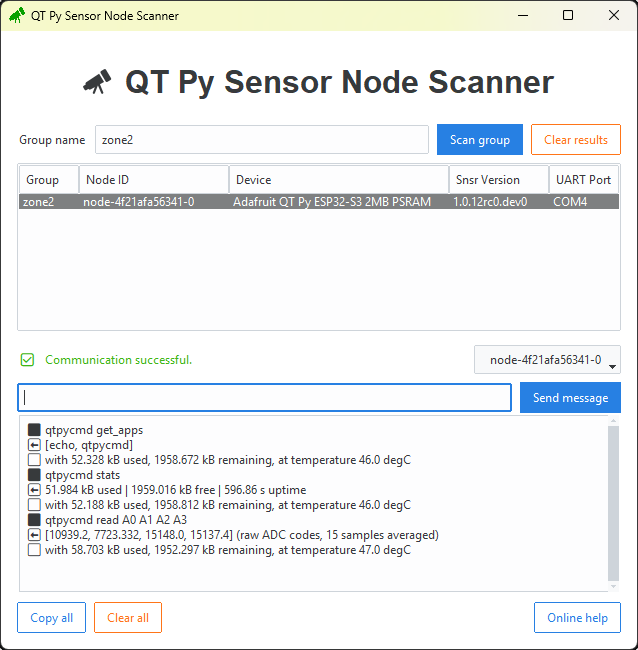
I agree, Scanner: ✅ "Communication successful." I'm glad there has only been one surprise so far.
Analog plotter
It seems like everything is running smoothly. The last step of the Getting started guide is to run the Analog Plotter example from the Customize page.
But to use this node, I need to set the MQTT group to zone2 in addition to enabling MQTT in the example's configuration.
> python analog_plotter.py
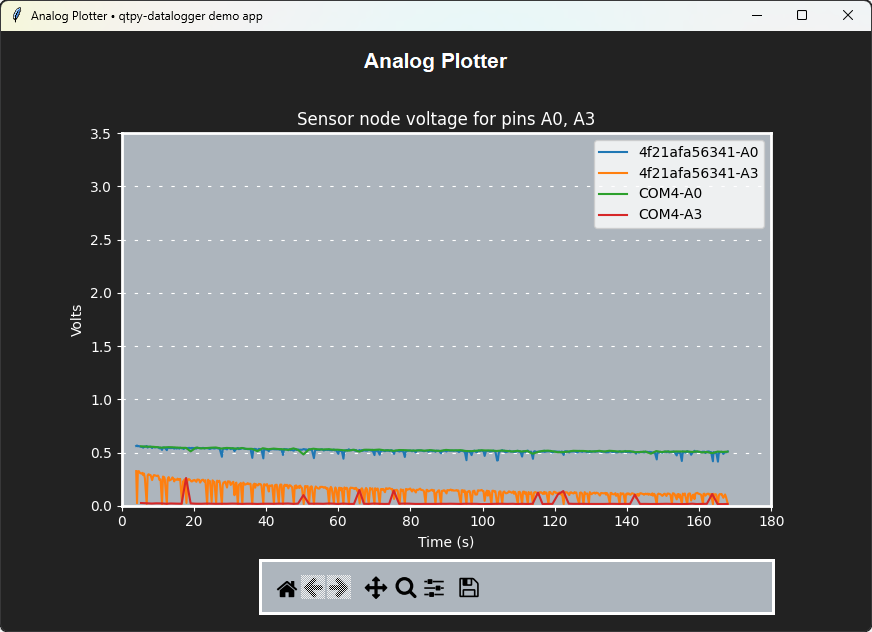
The node is sending analog data in dual-mode, responding to both UART and MQTT commands.
Yes, everything is running smoothly.
At least, until the next surprise… (⌐■_■)